Showing posts with label RubyOnRails. Show all posts

Wednesday, 20 April 2016

AJAX in Ruby On Rails: Sample Application


1) Create a new project. Generate Model and Controller

[shabbir@neutron Aptana Studio 3 Workspace]$ rails new ajax1

[shabbir@neutron Aptana Studio 3 Workspace]$ cd ajax1/

[shabbir@neutron ajax1]$ rails generate model Task name:string 

[shabbir@neutron ajax1]$ rake db:migrate 

[shabbir@neutron ajax1]$ rails generate controller tasks index


2) routes.rb

  resources :tasks

  root 'tasks#index'


3) task_controller.rb

class TasksController < ApplicationController
  def index
    @tasks = Task.all
  end

  def new
    @task = Task.new
  end

  def create
    @task= Task.new(task_params)
    @task.save
   
    @tasks = Task.all
  end     

  def edit
    @task = Task.find(params[:id])
  end
 
  def update
    @task = Task.find(params[:id])
    @task.update(task_params)

    @tasks = Task.all
  end

  def destroy
    @task = Task.find(params[:id])
    @task.destroy

    @tasks = Task.all
  end
 
  private
  def task_params
    params.require(:task).permit(:name)
  end
end


4)  Views

When the user clicks on the "New Task" link, an AJAX request is sent to the server since "remote: true' is set.
index.html.erb

<div>
    <%= link_to "New Task" , new_task_path, id: "new_link", remote: true %>
</div>

<div id="task_form" style="display:none">
</div>

<h2> List All Tasks </h2>

<div id="tasks">
<%= render 'list' %>
</div>


When the user clicks on the "Edit" or "Delete" links, an AJAX request is sent to the server since "remote: true' is set.
_list.html.erb

<table>
<tr>
    <th>Name</th><th colspan="3"></th>       
</tr>   

<% @tasks.each do |task| %>
    <tr>
        <td><%= task.name %> </td>
        <td><%= link_to 'Edit', edit_task_path(task), remote: true %></td>
        <td><%= link_to 'Delete', task, method: :delete, data: {confirm: 'Are you sure ?'}, remote: true %></td>
       
    </tr>
<% end %>
</table>


When the user submits the form, an AJAX request is sent to the server since "remote: true' is set.
  _form.html.erb

<%= form_for @task, remote: true do |f| %>

<%= f.label :name %>
<%= f.text_field :name %>

<%= f.submit "Save" %>
<% end %>


5) Javascript


When the user clicks on the "New Task" link, the form is displayed and the "New Task" link is hidden.  
new.js.erb

$("#new_link").hide();

$("#task_form").html("<%= j (render 'form') %>");

$("#task_form").slideDown();


After the Task is created, the "New Task" link is displayed ,the form is hidden and the list of tasks is updated.

create.js.erb

$("#new_link").show();

$("#task_form").slideUp();

$("#tasks").html("<%= j (render('list')) %>" );


When the user clicks on the "Edit" link, the form is displayed and the "New Task" link is hidden.  

edit.js.erb

$("#new_link").hide();

$("#task_form").html("<%= j (render 'form') %>");

$("#task_form").slideDown();


After the Task is updated, the "New Task" link is displayed ,the form is hidden and the list of tasks is updated.

update.js.erb
$("#new_link").show();

$("#task_form").slideUp();

$("#tasks").html("<%= j (render('list')) %>" );


When the user clicks on the "Delete" link, the task is destroyed and the list of tasks is updated.

destroy.js.erb
 $("#tasks").html("<%= j (render('list')) %>" );


Sunday, 1 November 2015

Install Ruby on Rails in CentOS7


1) Install prerequisites.

[shabbir@compute1~]$ sudo yum install -y git-core zlib zlib-devel gcc-c++ patch readline readline-devel libyaml-devel libffi-devel openssl-devel make bzip2 autoconf automake libtool bison curl sqlite-devel


2) Install rbenv

[shabbir@compute1~]$ git clone git://github.com/sstephenson/rbenv.git .rbenv

[shabbir@compute1~]$ echo 'export PATH="$HOME/.rbenv/bin:$PATH"' >> ~/.bash_profile

[shabbir@compute1~]$ echo 'eval "$(rbenv init -)"' >> ~/.bash_profile
  
[shabbir@compute1~]$ exec $SHELL
  
[shabbir@compute1~]$ git clone git://github.com/sstephenson/ruby-build.git ~/.rbenv/plugins/ruby-build
  
[shabbir@compute1~]$ echo 'export PATH="$HOME/.rbenv/plugins/ruby-build/bin:$PATH"' >> ~/.bash_profile
  
[shabbir@compute1~]$ exec $SHELL

Reboot the machine.
[shabbir@compute1~]$ systemctl reboot


3) Install Ruby

[shabbir@compute1 ~]$ rbenv install -v 2.2.3

[shabbir@compute1 ~]$ rbenv global 2.2.3


Verify that Ruby was installed properly.
[shabbir@compute1 ~]$ ruby -v
ruby 2.2.3p173 (2015-08-18 revision 51636) [x86_64-linux]


[shabbir@compute1 ~]$ echo "gem: --no-document" > ~/.gemrc

[shabbir@compute1 ~]$ gem install bundler


4) Install Rails 

[shabbir@compute1 ~]$ gem install rails -v 4.2.4

[shabbir@compute1 ~]$ rbenv rehash 

Verify that Rails was installed properly.
[shabbir@compute1 ~]$ rails -v
Rails 4.2.4


5) Install JavaScript Runtime

Install EPEL Repository.
[shabbir@compute1 ~]$ sudo yum -y install epel-release


[shabbir@compute1 ~]$ sudo yum install nodejs


6) Install Database

[shabbir@compute1 ~]$ sudo yum groupinstall mariadb


[shabbir@compute1 ~]$ sudo yum install mariadb-devel

[shabbir@compute1 ~]$ sudo systemctl enable mariadb

[shabbir@compute1 ~]$ sudo systemctl start mariadb 

[shabbir@compute1 ~]$ gem install mysql

[shabbir@compute1 ~]$ rbenv rehash


7) Create 'Hello World' Application

7.1) Create Demo Project
[shabbir@compute1 ~]$ rails new demo


7.2) Start the Web Server.
[shabbir@compute1 ~]$ cd demo 

[shabbir@compute1 demo]$ rails server

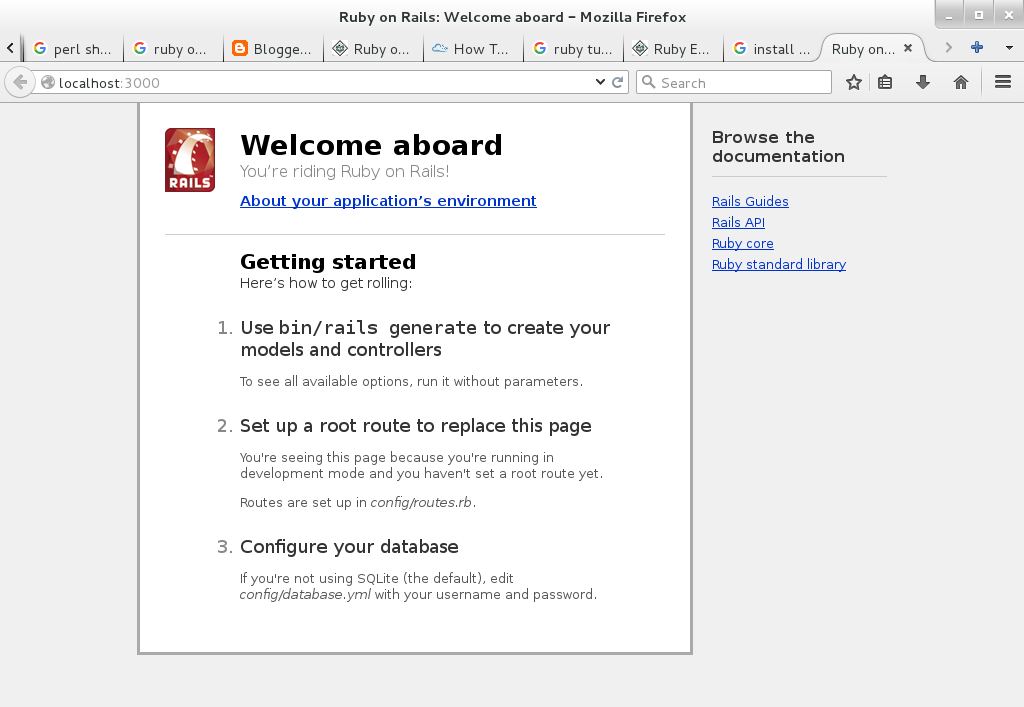
7.3) Open a browser and type the following URL. http://localhost:3000


NOTE: To stop the web server, hit Ctrl+C in the terminal window where it's running.


7.4) Create a new controller called "welcome" with an action called "index".

[shabbir@compute1 demo]$ generate controller welcome index
      create  app/controllers/welcome_controller.rb
       route  get 'welcome/index'
      invoke  erb
      create    app/views/welcome
      create    app/views/welcome/index.html.erb
      invoke  test_unit
      create    test/controllers/welcome_controller_test.rb
      invoke  helper
      create    app/helpers/welcome_helper.rb
      invoke    test_unit
      invoke  assets
      invoke    coffee
      create      app/assets/javascripts/welcome.coffee
      invoke    scss
      create      app/assets/stylesheets/welcome.scss


The controller, is located at app/controllers/welcome_controller.rb and the view, located at app/views/welcome/index.html.erb.


7.5) Edit the View.

[shabbir@compute1 demo]$ vi app/views/welcome/index.html.erb

<h1>Hello, World!</h1>


7.6) Now that we have made the controller and view, we need to tell Rails when we want "Hello, World!" to show up. In our case, we want it to show up when we navigate to the root URL of our site, http://localhost:3000. At the moment, "Welcome aboard" is occupying that spot.

Edit the application's routing file.
[shabbir@compute1 demo]$ vi config/routes.rb

Uncomment the following line
  root 'welcome#index'


7.7) Ensure that the Web server is running. Open a browser and type the following URL. http://localhost:3000